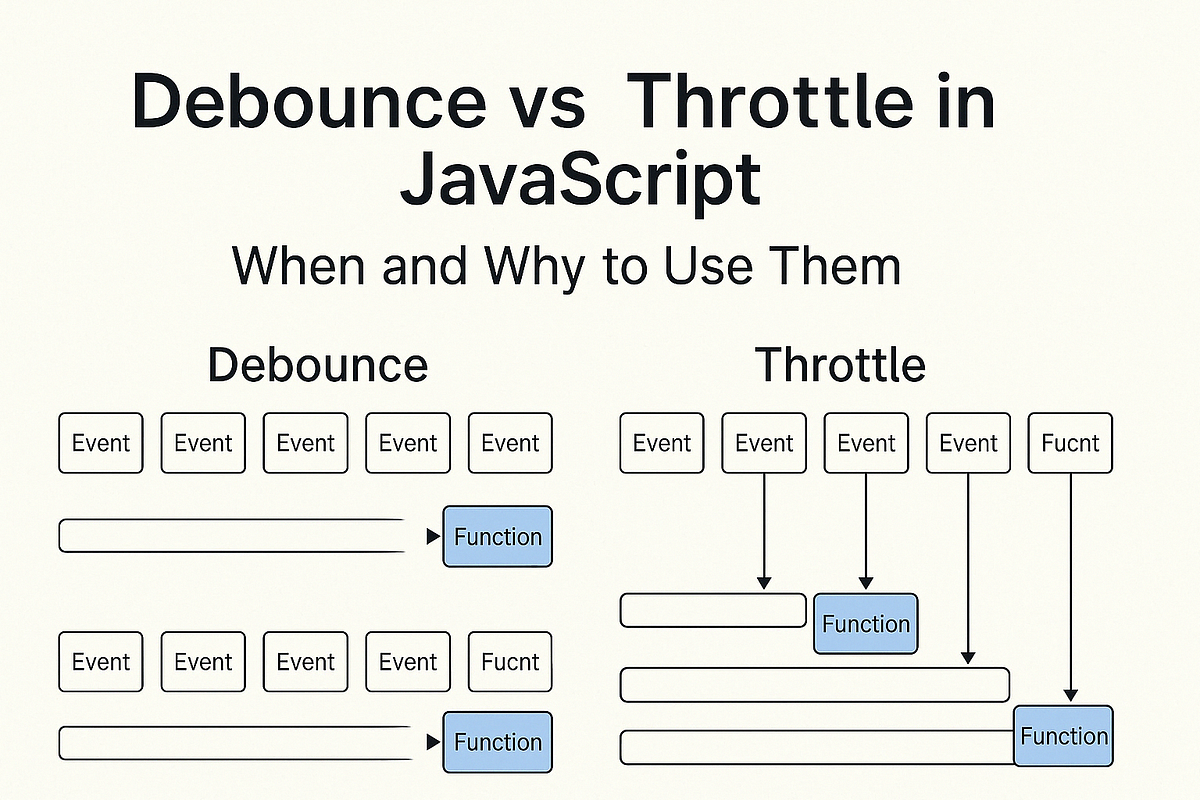
Debounce và Throttle trong JavaScript – Làm mượt UI & tối ưu hiệu suất
6 phút
Khi xử lý events như typing, scrolling, resizing… nếu không kiểm soát tần suất, ứng dụng có thể bị lag hoặc crash. Debounce và Throttle là 2 kỹ thuật quan trọng để giải quyết vấn đề này.
Vấn đề: Event quá nhiều lần ⚡
Ví dụ search input không tối ưu
// ❌ Gọi API mỗi lần gõ phím - Tệ!
const searchInput = document.getElementById('search');

searchInput.addEventListener('input', (e) => {
    searchAPI(e.target.value); // Gọi API liên tục!
});

// Gõ "Hello" = 5 API calls: H, He, Hel, Hell, Hello
// Tốn bandwidth, lag UI, server quá tải 💸
Ví dụ scroll event không tối ưu
// ❌ Tính toán mỗi lần scroll - Lag!
window.addEventListener('scroll', () => {
    updateProgressBar(); // Chạy hàng trăm lần/giây!
    checkElementInView();
    animateElements();
});

// Scroll 1 giây = 60-120 lần chạy → UI lag 🐌
Debounce: “Chờ người dùng ngừng” ⏳
Debounce chỉ thực thi sau khi user ngừng trigger event trong khoảng thời gian nhất định.
Tự code Debounce function
function debounce(func, delay) {
    let timeoutId;

    return function(...args) {
        // Hủy timeout cũ (nếu có)
        clearTimeout(timeoutId);

        // Đặt timeout mới
        timeoutId = setTimeout(() => {
            func.apply(this, args);
        }, delay);
    };
}
Ví dụ: Search input với Debounce
// ✅ Chỉ gọi API khi user ngừng gõ 300ms
const searchInput = document.getElementById('search');

const debouncedSearch = debounce((query) => {
    console.log('Searching for:', query);
    searchAPI(query);
}, 300);

searchInput.addEventListener('input', (e) => {
    debouncedSearch(e.target.value);
});

// Gõ "Hello" nhanh = 1 API call duy nhất ✅
Ví dụ: Window resize với Debounce
// ✅ Chỉ recalculate khi user ngừng resize
const debouncedResize = debounce(() => {
    console.log('Window resized!');
    recalculateLayout();
    updateChartSize();
}, 250);

window.addEventListener('resize', debouncedResize);
Throttle: “Giới hạn tần suất” 🎛️
Throttle giới hạn function chỉ chạy tối đa 1 lần trong khoảng thời gian nhất định.
Tự code Throttle function
function throttle(func, delay) {
    let lastCall = 0;

    return function(...args) {
        const now = Date.now();

        // Chỉ chạy nếu đã đủ thời gian delay
        if (now - lastCall >= delay) {
            lastCall = now;
            func.apply(this, args);
        }
    };
}
Ví dụ: Scroll event với Throttle
// ✅ Chỉ update 1 lần/16ms (≈60fps)
const throttledScroll = throttle(() => {
    const scrollPercent = (window.scrollY / (document.body.scrollHeight - window.innerHeight)) * 100;
    updateProgressBar(scrollPercent);

    // Check lazy loading
    checkLazyImages();
}, 16);

window.addEventListener('scroll', throttledScroll);
Ví dụ: Button click protection
// ✅ Chống spam click
const submitButton = document.getElementById('submit');

const throttledSubmit = throttle(() => {
    console.log('Submitting form...');
    submitForm();
}, 1000);

submitButton.addEventListener('click', throttledSubmit);
// Click liên tục = chỉ submit 1 lần/giây
Debounce vs Throttle: Khi nào dùng gì? 🤔
| Use Case | Debounce | Throttle | Lý do |
|---|---|---|---|
| Search input | ✅ | ❌ | Chờ user gõ xong |
| Form validation | ✅ | ❌ | Validate khi ngừng nhập |
| Save draft | ✅ | ❌ | Save khi ngừng gõ |
| Scroll progress | ❌ | ✅ | Update liên tục nhưng giới hạn |
| Mouse move animation | ❌ | ✅ | Animation mượt |
| API rate limiting | ❌ | ✅ | Giới hạn request/s |
| Resize handler | ✅ | ❌ | Recalculate khi ngừng resize |
| Button spam protection | ❌ | ✅ | Giới hạn click rate |
Minh họa trực quan
// Event timeline: ||||||||||||||||||||
//                 1 2 3 4 5 6 7 8 9 10 (giây)

// Debounce (300ms): Chỉ chạy sau khi ngừng 300ms
// Execute:          ❌❌❌❌❌❌❌❌❌✅ (cuối cùng)

// Throttle (1s): Chạy tối đa 1 lần/giây
// Execute:          ✅❌❌❌❌✅❌❌❌❌ (định kỳ)
Ví dụ thực tế: Search với Debounce 🔍
HTML
<div class="search-container">
    <input
        type="text"
        id="search-input"
        placeholder="Tìm kiếm sản phẩm..."
    >
    <div id="search-results"></div>
    <div id="search-stats"></div>
</div>
JavaScript
// Mock API
async function searchAPI(query) {
    const response = await fetch(`/api/search?q=${query}`);
    return response.json();
}

// Debounce function
function debounce(func, delay) {
    let timeoutId;
    return function(...args) {
        clearTimeout(timeoutId);
        timeoutId = setTimeout(() => func.apply(this, args), delay);
    };
}

// Search handler
let searchCount = 0;

const handleSearch = async (query) => {
    if (!query.trim()) {
        document.getElementById('search-results').innerHTML = '';
        return;
    }

    searchCount++;
    document.getElementById('search-stats').textContent =
        `Tìm kiếm lần thứ ${searchCount}: "${query}"`;

    try {
        const results = await searchAPI(query);
        displayResults(results);
    } catch (error) {
        console.error('Search error:', error);
    }
};

// Apply debounce
const debouncedSearch = debounce(handleSearch, 300);

// Event listener
document.getElementById('search-input').addEventListener('input', (e) => {
    debouncedSearch(e.target.value);
});

function displayResults(results) {
    const container = document.getElementById('search-results');
    container.innerHTML = results.map(item =>
        `<div class="result-item">${item.name}</div>`
    ).join('');
}

// So sánh: Không dùng debounce
// document.getElementById('search-input').addEventListener('input', (e) => {
//     handleSearch(e.target.value); // Gọi API mỗi ký tự!
// });
Ví dụ thực tế: Scroll với Throttle 📜
HTML
<div class="progress-container">
    <div class="progress-bar" id="progress-bar"></div>
</div>

<div class="content">
    <!-- Nội dung dài... -->
</div>

<div class="scroll-stats" id="scroll-stats"></div>
CSS
.progress-container {
    position: fixed;
    top: 0;
    left: 0;
    width: 100%;
    height: 4px;
    background: #f0f0f0;
    z-index: 1000;
}

.progress-bar {
    height: 100%;
    background: linear-gradient(90deg, #667eea 0%, #764ba2 100%);
    width: 0%;
    transition: width 0.1s ease;
}
JavaScript
// Throttle function
function throttle(func, delay) {
    let lastCall = 0;
    return function(...args) {
        const now = Date.now();
        if (now - lastCall >= delay) {
            lastCall = now;
            func.apply(this, args);
        }
    };
}

// Scroll handler
let scrollCount = 0;

const handleScroll = () => {
    scrollCount++;

    // Tính toán progress
    const scrollTop = window.pageYOffset;
    const docHeight = document.body.offsetHeight;
    const winHeight = window.innerHeight;
    const scrollPercent = (scrollTop / (docHeight - winHeight)) * 100;

    // Update progress bar
    document.getElementById('progress-bar').style.width = `${scrollPercent}%`;

    // Update stats
    document.getElementById('scroll-stats').textContent =
        `Scroll events: ${scrollCount} | Progress: ${Math.round(scrollPercent)}%`;

    // Lazy loading check (giả lập)
    checkLazyImages();
};

// Apply throttle
const throttledScroll = throttle(handleScroll, 16); // ~60fps

// Event listener
window.addEventListener('scroll', throttledScroll);

function checkLazyImages() {
    // Logic lazy loading images
    // console.log('Checking lazy images...');
}

// So sánh: Không dùng throttle
// window.addEventListener('scroll', handleScroll); // Chạy hàng trăm lần!
Advanced: Throttle với leading/trailing options 🎯
function throttleAdvanced(func, delay, options = {}) {
    const { leading = true, trailing = true } = options;
    let timeoutId, lastCall = 0, lastArgs;

    return function(...args) {
        const now = Date.now();

        // First call
        if (!lastCall && leading === false) {
            lastCall = now;
        }

        const remaining = delay - (now - lastCall);
        lastArgs = args;

        if (remaining <= 0 || remaining > delay) {
            if (timeoutId) {
                clearTimeout(timeoutId);
                timeoutId = null;
            }
            lastCall = now;
            func.apply(this, args);
        } else if (!timeoutId && trailing !== false) {
            timeoutId = setTimeout(() => {
                lastCall = leading === false ? 0 : Date.now();
                timeoutId = null;
                func.apply(this, lastArgs);
            }, remaining);
        }
    };
}

// Sử dụng
const advancedThrottle = throttleAdvanced(handleScroll, 100, {
    leading: true,   // Chạy ngay lập tức
    trailing: false  // Không chạy cuối
});
Performance Tips 🚀
1. Chọn delay phù hợp
// Search input: 300-500ms (UX tốt)
const searchDebounce = debounce(searchAPI, 300);

// Form validation: 500ms (ít spam)
const validateDebounce = debounce(validateForm, 500);

// Scroll: 16ms (60fps smooth)
const scrollThrottle = throttle(handleScroll, 16);

// Resize: 250ms (đủ nhanh)
const resizeDebounce = debounce(handleResize, 250);
2. Cleanup khi component unmount
class SearchComponent {
    constructor() {
        this.debouncedSearch = debounce(this.search.bind(this), 300);
        this.element.addEventListener('input', this.debouncedSearch);
    }

    destroy() {
        // ✅ Cleanup để tránh memory leak
        this.element.removeEventListener('input', this.debouncedSearch);
    }

    search(query) {
        // API call
    }
}
3. Sử dụng thư viện
// Lodash - Production ready
import { debounce, throttle } from 'lodash';

const debouncedFn = debounce(myFunction, 300);
const throttledFn = throttle(myFunction, 100);

// Hoặc lightweight alternative
npm install just-debounce-it just-throttle
Kết luận 📋
| Kỹ thuật | Khi nào dùng | Ví dụ | Lợi ích |
|---|---|---|---|
| Debounce | Chờ user hoàn thành action | Search, resize, validation | Giảm API calls, UX tốt |
| Throttle | Giới hạn tần suất execution | Scroll, mouse move, button spam | Performance ổn định |
Key takeaways:
- 🔍 Search input → Debounce (300ms)
- 📜 Scroll events → Throttle (16ms)
- 🎯 Button protection → Throttle (1000ms)
- 📏 Window resize → Debounce (250ms)
Performance impact:
- ❌ Không tối ưu: 1000+ function calls/second
- ✅ Với Debounce/Throttle: 1-60 calls/second
- 🚀 Kết quả: UI mượt hơn, server ít tải hơn!
Áp dụng ngay vào project để cải thiện UX và performance! 🎉